Production Scaling and High Availability
This guide explains how to configure an existing Upbound Space deployment for production operation at scale.
Use this guide when you're ready to deploy production scaling, high availability, and monitoring in your Space.
Prerequisites
Before you begin scaling your Spaces deployment, make sure you have:
- A working Space deployment
- Cluster administrator access
- An understanding of load patterns and growth in your organization
- A familiarity with node affinity, tainting, and Horizontal Pod Autoscaling (HPA)
Production scaling strategy
In this guide, you will:
- Create dedicated node pools for different component types
- Configure high-availability to ensure there are no single points of failure
- Set dynamic scaling for variable workloads
- Optimize your storage and component operations
- Monitor your deployment health and performance
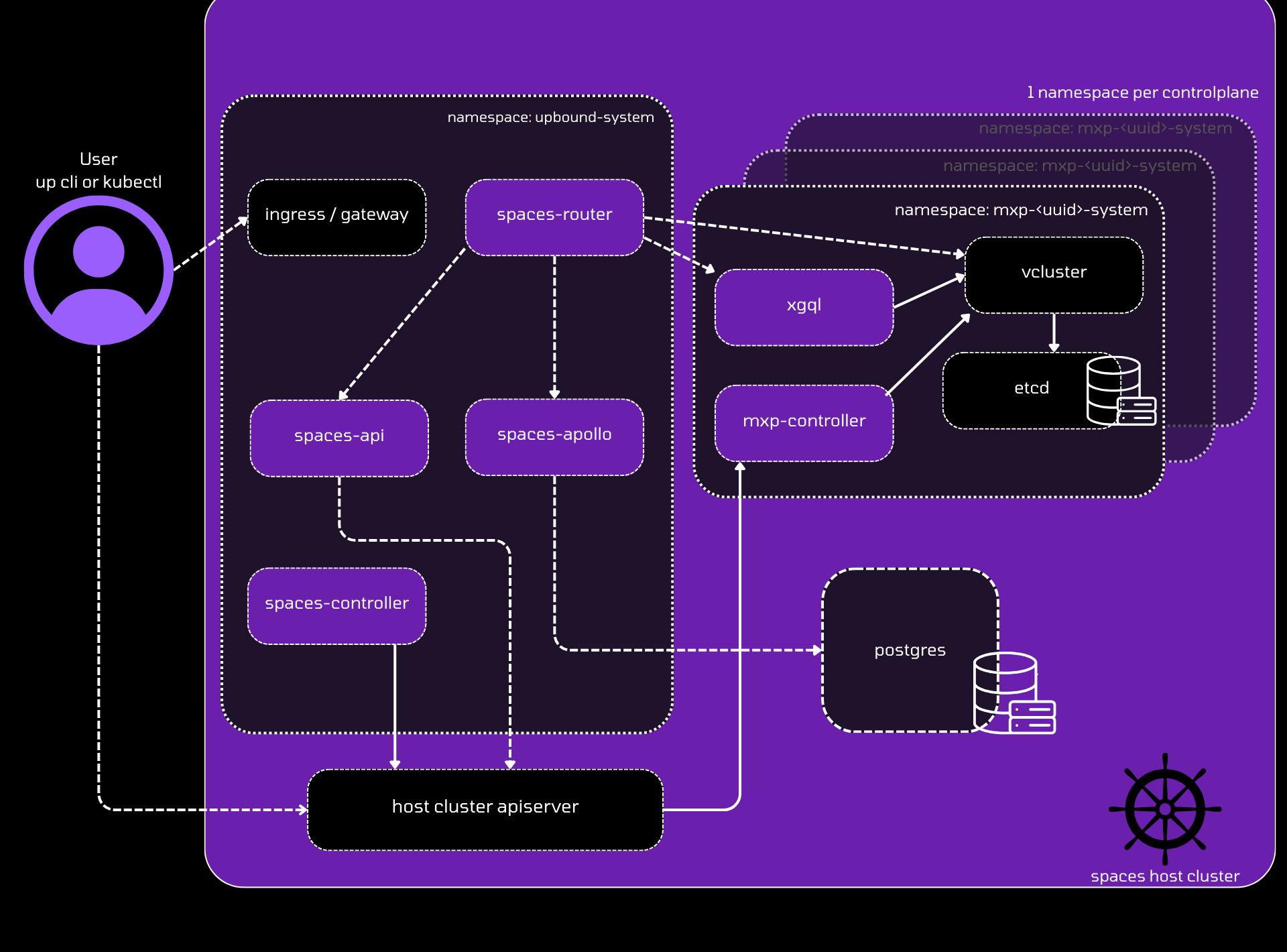
Spaces architecture
The basic Spaces workflow follows the pattern below:
Node architecture
You can mitigate resource contention and improve reliability by separating system components into dedicated node pools.
etcd dedicated nodes
etcd performance directly impacts your entire Space, so isolate it for
consistent performance.
-
Create a dedicated
etcdnode poolRequirements:
- Minimum: 3 nodes for HA
- Instance type: General purpose with high network throughput/low latency
- Storage: High performance storage (
etcdis I/O sensitive)
-
Taint
etcdnodes to reserve themkubectl taint nodes <etcd-node> target=etcd:NoSchedule -
Configure
etcdstorageetcdis sensitive to storage I/O performance. Review theetcdscaling documentation for specific storage guidance.
API server dedicated nodes
API servers handle all control plane requests and should run on dedicated infrastructure.
-
Create dedicated API server nodes
Requirements:
- Minimum: 2 nodes for HA
- Instance type: Compute-optimized, memory-optimized, or general-purpose
- Scaling: Scale vertically based on API server load patterns
-
Taint API server nodes
kubectl taint nodes <api-server-node> target=apiserver:NoSchedule
Configure cluster autoscaling
Enable cluster autoscaling for all node pools.
For AWS EKS clusters, Upbound recommends using Karpenter for
improved bin-packing and instance type selection.
For GCP GKE clusters, follow the GKE autoscaling guide.
For Azure AKS clusters, follow the AKS autoscaling guide.
Configure high availability
Ensure control plane components can survive node and zone failures.
Enable high availability mode
-
Configure control planes for high availability
controlPlanes:
  ha:
    enabled: true
This configures control plane pods to run with multiple replicas and associated pod disruption budgets.
Configure component distribution
-
Set up API server pod distribution
controlPlanes:
  vcluster:
    affinity:
      nodeAffinity:
        requiredDuringSchedulingIgnoredDuringExecution:
          nodeSelectorTerms:
            - matchExpressions:
                - key: target
                  operator: In
                  values:
                    - apiserver
      podAntiAffinity:
        requiredDuringSchedulingIgnoredDuringExecution:
        - labelSelector:
            matchExpressions:
            - key: app
              operator: In
              values:
              - vcluster
          topologyKey: "kubernetes.io/hostname"
        preferredDuringSchedulingIgnoredDuringExecution:
        - podAffinityTerm:
            labelSelector:
              matchExpressions:
              - key: app
                operator: In
                values:
                - vcluster
            topologyKey: topology.kubernetes.io/zone
weight: 100 -
Configure
etcdpod distributioncontrolPlanes:
etcd:
affinity:
nodeAffinity:
requiredDuringSchedulingIgnoredDuringExecution:
nodeSelectorTerms:
- matchExpressions:
- key: target
operator: In
values:
- etcd
podAntiAffinity:
requiredDuringSchedulingIgnoredDuringExecution:
- labelSelector:
matchExpressions:
- key: app
operator: In
values:
- vcluster-etcd
topologyKey: "kubernetes.io/hostname"
preferredDuringSchedulingIgnoredDuringExecution:
- podAffinityTerm:
labelSelector:
matchExpressions:
- key: app
operator: In
values:
- vcluster-etcd
topologyKey: topology.kubernetes.io/zone
weight: 100
Configure tolerations
Allow control plane pods to schedule on the tainted dedicated nodes (available in Spaces v1.14+).
-
Add tolerations for
etcdpodscontrolPlanes:
etcd:
tolerations:
- key: "target"
operator: "Equal"
value: "etcd"
effect: "NoSchedule" -
Add tolerations for API server pods
controlPlanes:
  vcluster:
    tolerations:
    - key: "target"
      operator: "Equal"
      value: "apiserver"
      effect: "NoSchedule"
Configure autoscaling for Spaces components
Set up the Spaces system components to handle variable load automatically.
Scale API and apollo services
-
Configure minimum replicas for availability
api:
  replicaCount: 2

features:
  alpha:
    apollo:
      enabled: true
      replicaCount: 2
Both services support horizontal and vertical scaling based on load patterns.
Configure router autoscaling
The spaces-router is the entry point for all traffic and needs intelligent
scaling.
-
Enable Horizontal Pod Autoscaler
router:
  hpa:
    enabled: true
    minReplicas: 2
    maxReplicas: 8
    targetCPUUtilizationPercentage: 80
targetMemoryUtilizationPercentage: 80 -
Monitor scaling factors
Router scaling behavior:
- Vertical scaling: Scales based on number of control planes
- Horizontal scaling: Scales based on request volume
- Resource monitoring: Monitor CPU and memory usage
Configure controller scaling
The spaces-controller manages Space-level resources and requires vertical
scaling.
-
Configure adequate resources with headroom
controller:
  resources:
    requests:
      cpu: "500m"
      memory: "1Gi"
    limits:
      cpu: "2000m"
memory: "4Gi"Important: The controller can spike when reconciling large numbers of control planes, so provide adequate headroom for resource spikes.
Set up production storage
Configure Query API database
-
Use a managed PostgreSQL database
Recommended services:
Requirements:
- Minimum 400 IOPS performance
Monitoring
Monitor key metrics to ensure healthy scaling and identify issues quickly.
Control plane health
Track these spaces-controller metrics:
-
Total control planes
spaces_control_plane_existsTracks the total number of control planes in the system.
-
Degraded control planes
spaces_control_plane_degradedReturns control planes that don't have a
Synced,Ready, andHealthystate. -
Stuck control planes
spaces_control_plane_stuckControl planes stuck in a provisioning state.
-
Deletion issues
spaces_control_plane_deletion_stuckControl planes stuck during deletion.
Alerting
Configure alerts for critical scaling and health metrics:
- High error rates: Alert when 4xx/5xx response rates exceed thresholds
- Control plane health: Alert when degraded or stuck control planes exceed acceptable counts
Architecture overview
Spaces System Components:
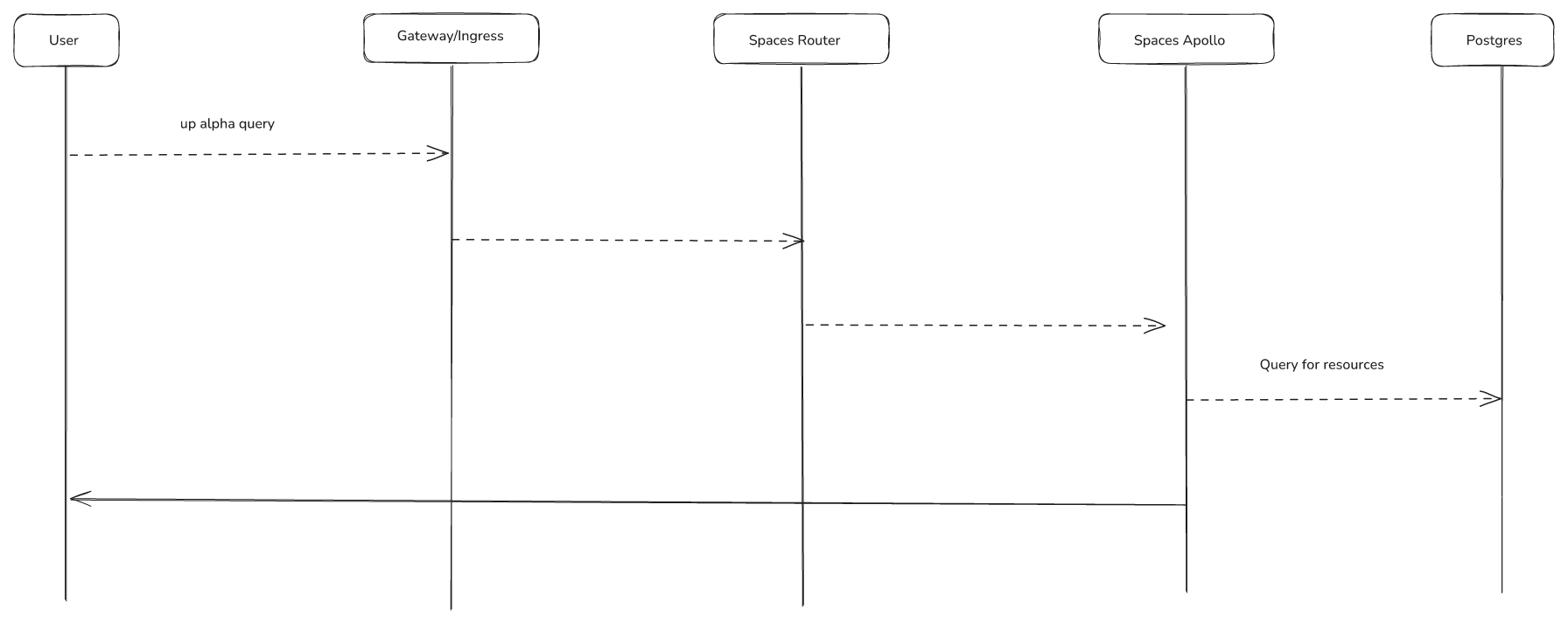
spaces-router: Entry point for all endpoints, dynamically builds routes to control plane API serversspaces-controller: Reconciles Space-level resources, serves webhooks, works withmxp-controllerfor provisioningspaces-api: API for managing groups, control planes, shared secrets, and telemetry objects (accessed only through spaces-router)spaces-apollo: Hosts the Query API, connects to PostgreSQL database populated byapollo-syncerpods
Control Plane Components (per control plane):
mxp-controller: Handles provisioning tasks, serves webhooks, installs UXP andXGQLXGQL: GraphQL API powering console viewskube-state-metrics: Collects usage metrics for billing (updated bymxp-controllerwhen CRDs change)vector: Works withkube-state-metricsto send usage data to external storage for billingapollo syncer: Syncsetcddata into PostgreSQL for the Query API
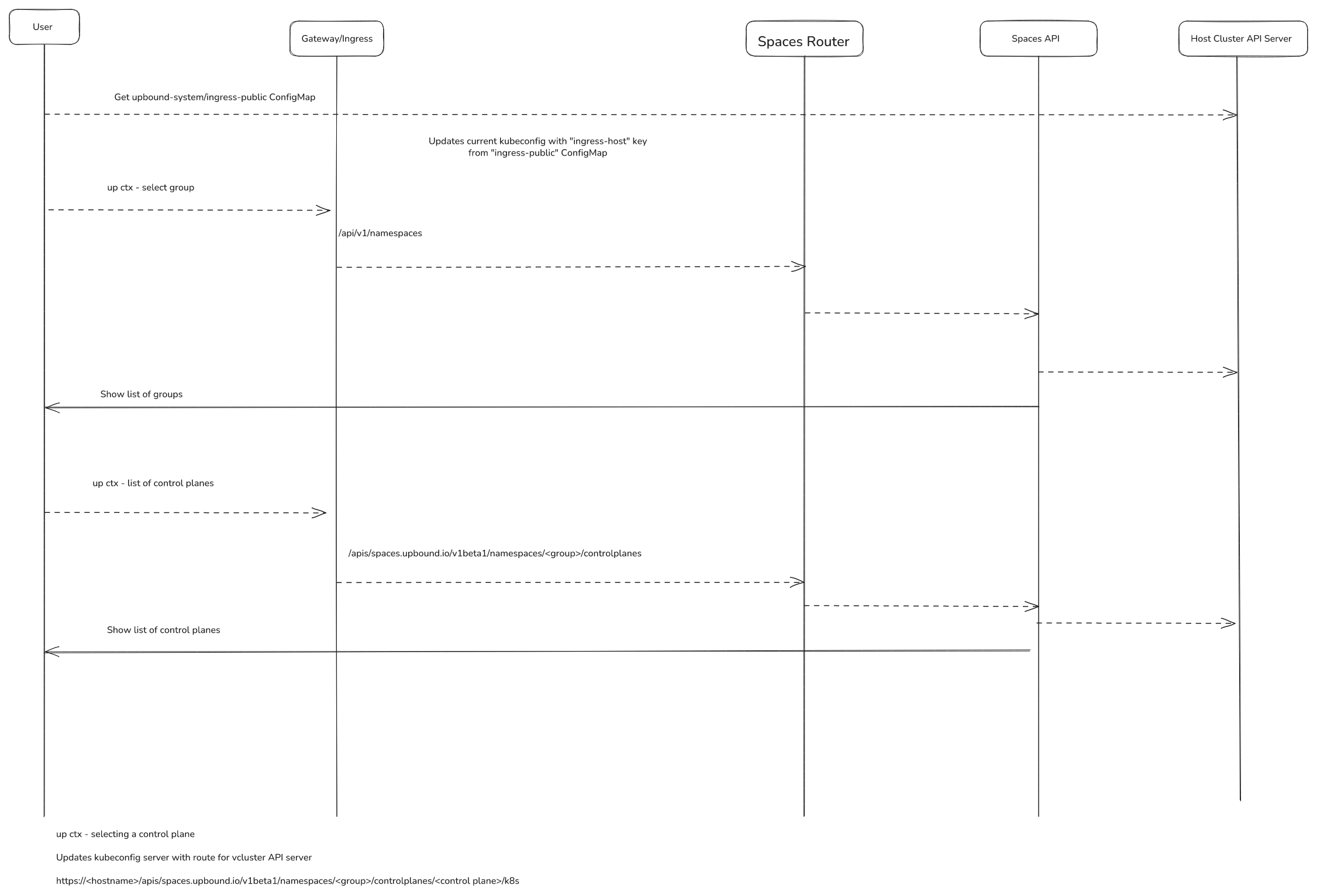
up ctx workflow
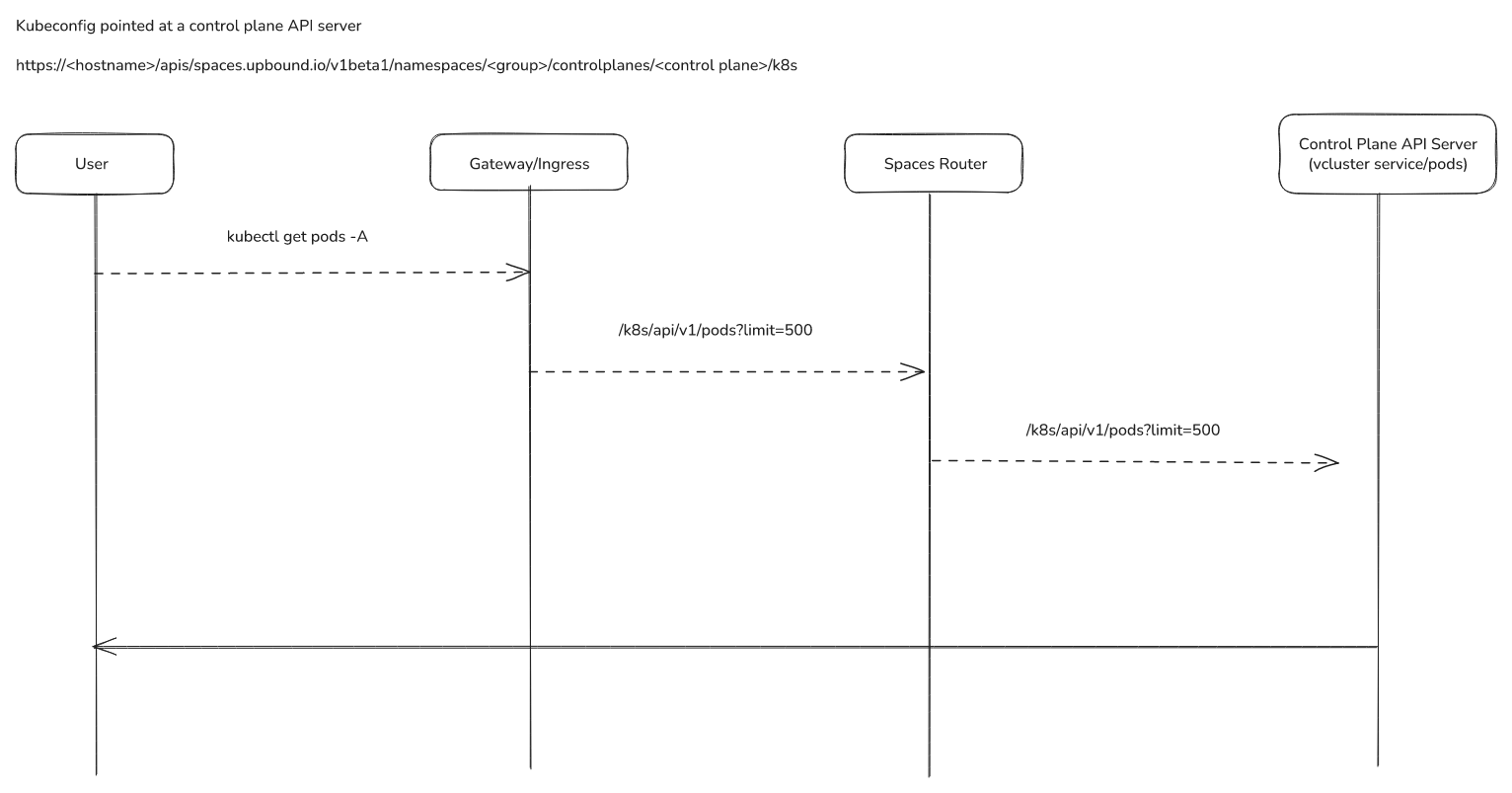
Access a control plane API server via kubectl
Query API/Apollo